
Organise
Message Templates
Write a message once, and OTT Helper fills in each account's details — username, links, expiry date, days left — every time you send it.
What it's for
If you send account details or renewal reminders to family members or friends you set up, you write the same message again and again. A template turns it into one tap, without copy-paste mistakes.
How it works
Templates are sorted into categories with their own icon and colour. In the editor, insert variables where the details should go; when you send, each variable is replaced with the chosen account's value. Templates support right-to-left and left-to-right text, and one can be set as the default.
| Variables you can insert |
|---|
| Username · Password · Host / Server URL · M3U URL · EPG URL · Expiry Date · Days Left · Connections · Allowed Formats |
Step by step
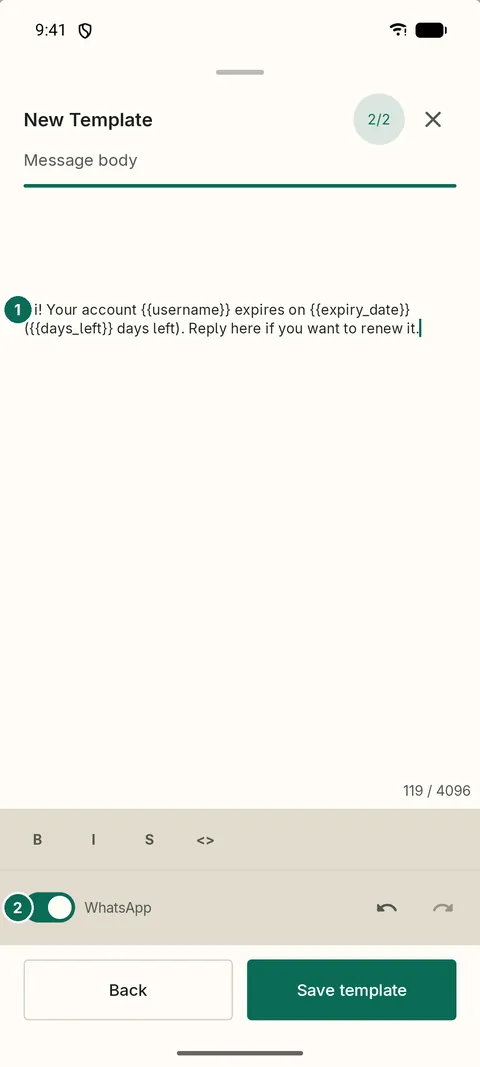
- 1The message with its variables
- 2Share via WhatsApp or Email

- 1The template, filled in for this account
- 2Insert: Template, Account or Link
Good to know
- Quick message lets you compose and share without saving a template.
- Before you send an expiry message to an account marked Banned or Disabled, the app warns you.
- There are no ready-made templates: you write your own, in your own words.